
Download FractionsPractice – free fractions learning app, math practice tool
Overview of FractionsPractice
FractionsPractice is a purpose‑built educational app that helps students, parents, and anyone who struggles with fractions to master the topic through interactive practice. The tool covers the entire spectrum of fraction work – from basic equivalent fractions and mixed numbers to challenging negative fractions – and presents it in a clean, kid‑friendly interface. With four difficulty tiers—Basic, Easy, Average, and Advanced—the app adapts to the learner’s current skill level and grows with them.
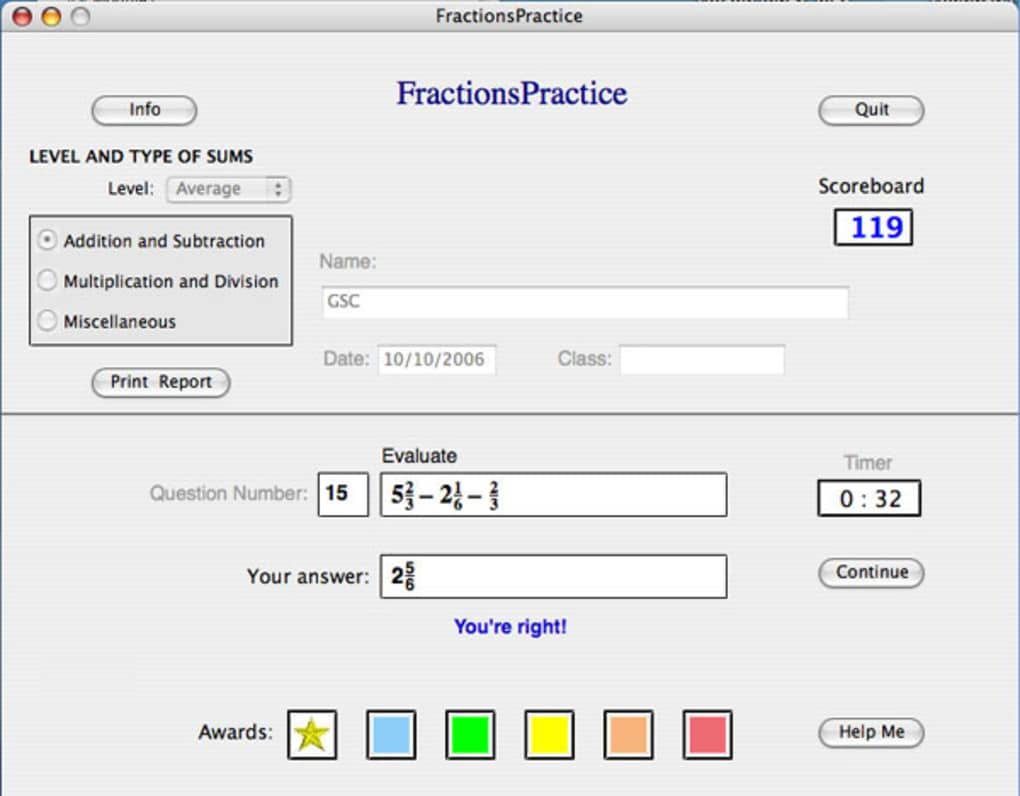
The Basic tier introduces core concepts such as equivalent fractions, mixed numbers, and improper fractions, while the Easy and Average tiers focus on arithmetic operations: addition, subtraction, multiplication, and division. The Advanced tier pushes learners into the realm of negative fractions, a topic that often trips up even the most confident students. One of the standout features of FractionsPractice is the library of 90 fully worked‑out examples.
Each example can be paused at any point for a “Help” prompt, offering step‑by‑step guidance without giving away the final answer. Once a user submits an answer, the app instantly grades it, displays the correct solution, and records the result for later review. At the end of a session, a comprehensive report is generated, mirroring the type of feedback teachers provide in a classroom setting.
While the app is free to download and use, it is designed to encourage repeated practice, making the 90‑example limit a reasonable starting point for most learners. Users who exhaust the default set can request additional practice packs (available as optional in‑app purchases) or simply revisit the existing problems to reinforce their understanding. Overall, FractionsPractice delivers a secure, ad‑free learning environment that blends the rigor of traditional homework with the convenience of a modern mobile app.
Key Features and How They Boost Learning
- Four Tiered Difficulty Levels: From Basic to Advanced, each tier gradually introduces more complex fraction concepts, ensuring learners are never overwhelmed.
- 90 Fully Worked‑Out Examples: A rich library of problems that cover equivalence, mixed numbers, arithmetic operations, and negative fractions.
- Instant Grading & Detailed Feedback: After each answer, the app shows the correct solution, highlights mistakes, and explains the reasoning.
- Help Button for Step‑by‑Step Guidance: Users can request hints at any stage, making the app a supportive tutor rather than a rigid grader.
- Automatic Report Generation: At the end of a session, a printable report summarises performance, mirroring school‑style progress cards.
- Customizable Practice Sessions: Learners can select specific topics or difficulty levels to focus on, tailoring practice to their personal needs.
- Secure, Ad‑Free Environment: No pop‑ups or third‑party trackers, ensuring a safe learning space for children.
- Cross‑Platform Availability: Fully compatible with Windows, macOS, Android, and iOS devices, allowing seamless transition between desktop and mobile.
Why These Features Matter
The tiered difficulty system mirrors the scaffolding approach used by teachers, providing just‑right challenges that keep motivation high. By offering a “Help” button, FractionsPractice reduces the frustration that often accompanies self‑directed study, turning errors into learning moments. Instant grading eliminates the waiting period associated with traditional homework, delivering immediate reinforcement that strengthens memory pathways. The automatically generated reports serve a dual purpose: they give learners a tangible sense of progress and supply parents or educators with data to identify areas that need extra attention.
Moreover, the cross‑platform design means students can practice on a school computer, then continue on a tablet at home, or even pull out a phone during a commute. This flexibility aligns with modern study habits where learning isn’t confined to a single device. Finally, the ad‑free promise safeguards young minds from unwanted distractions and potential privacy concerns—an essential consideration for any educational app in today’s digital landscape.
Installation Guide and Everyday Usage Tips
Step‑by‑Step Installation
- Visit the official website or your device’s app store (Google Play Store, Apple App Store, Microsoft Store, or Mac App Store).
- Search for “FractionsPractice” and tap the Download or Get button.
- Allow the app the necessary permissions (storage for report export, internet for optional updates).
- Once the download completes, open the app and grant any additional prompts to enable full functionality.
- On first launch, you’ll be greeted with a brief tutorial that walks you through the interface, difficulty selection, and the Help button.
Getting the Most Out of Daily Practice
After installation, start by selecting the Basic level if you’re new to fractions. Work through the first ten examples, using the Help button only when you feel truly stuck. This approach encourages active problem solving while still offering safety nets. As you progress, move to the Easy and Average levels, where the app introduces addition, subtraction, multiplication, and division. The built‑in timer (optional) can be turned on to simulate test conditions and improve speed.
When you reach the Advanced tier, focus on negative fractions. These problems often require a solid grasp of sign rules, so take advantage of the detailed explanations that appear after each submission. After completing a session, click the Generate Report button. The report can be saved as a PDF, emailed to a parent, or printed for offline review. For teachers, the app also offers a “Class Mode” where multiple student profiles can be managed from a single device, making group assessments straightforward.
To keep the app up‑to‑date, enable automatic updates in your device’s settings. FractionsPractice receives regular content expansions, bug fixes, and performance enhancements. If you ever encounter an issue, the built‑in Support tab connects you directly to the development team via email or live chat.
Compatibility, System Requirements, and Balanced Review
FractionsPractice runs natively on Windows 10 and later, macOS 10.13 (High Sierra) and newer, Android 6.0 (Marshmallow) or later, and iOS 12 or newer. The app requires at least 150 MB of free storage for the core package and an additional 50 MB for optional content packs. A stable internet connection is recommended for downloading updates and generating PDF reports, but the core practice functionality works offline after the initial installation.
Pros
- Comprehensive coverage of fraction concepts across four difficulty levels.
- Instant grading with clear, step‑by‑step feedback.
- 90 ready‑made examples plus optional expansion packs.
- Ad‑free, privacy‑focused design.
- Cross‑platform availability ensures seamless transition between devices.
- Automatic report generation mirrors classroom assessment.
- Help button reduces frustration and supports self‑paced learning.
Cons
- Limited to 90 default examples; heavy users may exhaust content quickly.
- No built‑in gamification (badges, leaderboards) to boost long‑term engagement.
- Advanced level focuses only on negative fractions, leaving other complex topics (e.g., mixed‑number conversion) for future updates.
- Optional premium content packs are not free, which may deter budget‑conscious users.
Balanced Review (Microdata)
Rating: 4.5/5
FractionsPractice delivers a solid, curriculum‑aligned experience for learners at any stage. Its instant feedback and detailed reports make it a valuable supplement to classroom instruction. While the limited example pool and lack of gamified incentives could be improved, the app’s clean design, cross‑platform support, and privacy‑first approach outweigh these minor drawbacks. Ideal for students, homeschooling families, and teachers seeking a reliable fraction practice tool.
Frequently Asked Questions
Is FractionsPractice completely free?
The core app, including all four difficulty levels and the 90 example set, is free to download and use. Optional premium content packs are available for a one‑time fee, but they are not required for effective learning.
Can I use FractionsPractice offline?
Yes. After the initial installation and any optional content download, the practice exercises work entirely offline. Internet is only needed for updates and report export.
Does the app store personal data?
FractionsPractice follows a strict privacy policy: it does not collect personal identifiers, and all data is stored locally on the device unless the user explicitly exports a report.
How often are new examples added?
The development team releases quarterly updates that include new example packs and minor feature enhancements. Users can download these updates automatically through their device’s app store.
Is there a teacher mode for classroom use?
Yes. A “Class Mode” allows educators to create multiple student profiles, assign specific difficulty levels, and view aggregated performance reports from a single device.
Conclusion – Should You Download FractionsPractice?
If you’re searching for a secure, ad‑free, and pedagogically sound tool to reinforce fraction skills, FractionsPractice stands out as a top choice. Its tiered difficulty system, instant feedback, and automatic reporting align closely with classroom best practices, while the cross‑platform availability ensures flexibility for today’s mobile learners. Although the default library of 90 examples may feel limited for power users, the optional content packs and regular updates keep the experience fresh. Whether you’re a student aiming to boost grades, a parent looking for a reliable homework helper, or a teacher seeking supplemental practice material, the app delivers tangible value without hidden costs.
Ready to strengthen your fraction fluency? Free USD download is just a click away. Install FractionsPractice today and start turning those confusing fraction problems into confident solutions.







